Leser administrativer Texte wollen möglichst schnell an Informationen gelangen, die für ihre Anliegen bzw. für ihre Person bedeutend sind. Häufig variieren Handlungsanweisungen bezüglich eines Sachverhalts jedoch nach Personengruppen oder deren Voraussetzungen. Damit der Leser sich und seine Bedürfnisse schnell im Text wiederfindet, erscheint eine deutlich sichtbare Trennung nach verschiedenen „Fällen“ sinnvoll.
Optimierungsangebot
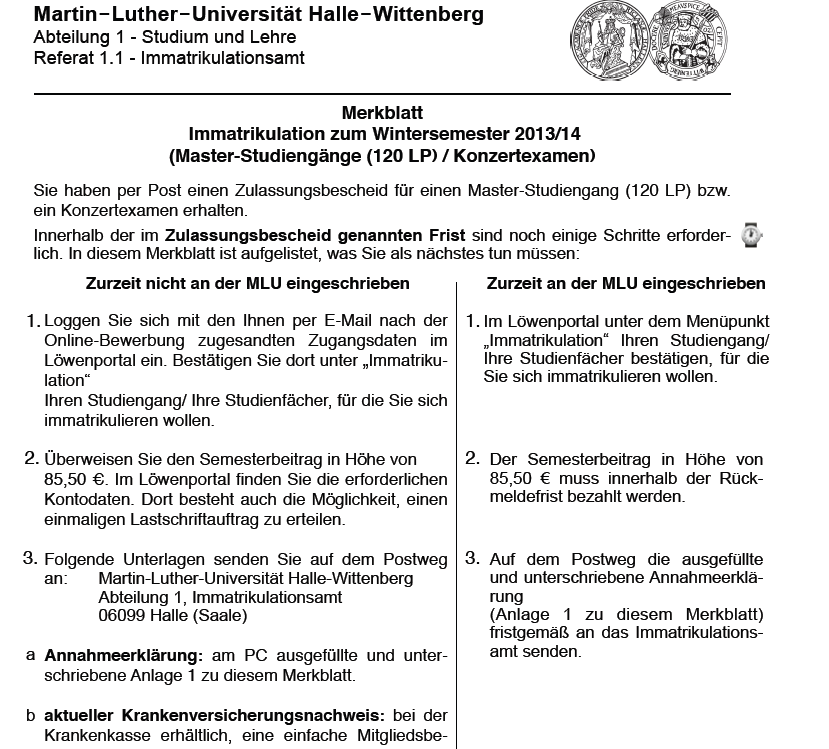 Bei der ersten Betrachtung des Optimierungsangebots des Merkblatts „Immatrikulation zum Wintersemester 2013/14“ wird dem Leser direkt eine Zuordnung zu „Zurzeit nicht an der MLU eingeschrieben“ und „Zurzeit an der MLU eingeschrieben“ angeboten. Der Leser muss seinen „Fall“ nicht im Dokument suchen, sondern wird direkt zu dem für ihn relevanten Inhalt geführt.
l6s3qv
Eine klare Strukturierung durch Fallunterscheidungen ist wirklich essenziell. Oft verliert man sich in langen Fließtexten, wenn man nur nach einer spezifischen Information sucht, die auf die eigene Situation zutrifft. Visuelle Trennungen oder Tabellen helfen da ungemein, die Lesbarkeit zu verbessern.
This is a really useful breakdown of how to structure conditional information for different reader groups. Clear case differentiation makes administrative texts far more scannable and user-friendly. Speaking of clarity and efficiency, if you’re ever looking to generate cinematic video content from text or images with native audio, I’ve found this platform incredibly helpful: minimax3.com — it turns ideas into polished visuals in no time. Thanks for sharing this insightful guide!
This is a great breakdown of how to structure information for different audiences. It reminds me of how clear categorization can make content more accessible — similar to how a good text-to-speech tool helps users find the right voice for their needs. If you’re ever looking to convert written instructions like these into natural audio for accessibility or convenience, I’ve found speechgeneration.net quite useful. It’s a free AI tool that turns text into lifelike speech and lets you download it as an MP3, which could complement your site’s focus on clarity and user-friendly communication. Worth a try!
Ein sehr durchdachter Beitrag zur klaren Strukturierung administrativer Texte – die Trennung nach Fällen ist ein bewährtes Mittel, um Leser schnell zu relevanten Informationen zu führen. Diese Logik erinnert mich an die Art und Weise, wie moderne Plattformen Inhalte personalisieren, um Nutzererlebnisse zu optimieren. Wer beispielsweise Videos aus Text oder Bildern generieren möchte, profitiert von ähnlich klaren Abläufen. Eine Plattform wie minimax3.com setzt genau auf dieses Prinzip: Sie verwandelt Eingaben in kinoreife Clips mit nativen Audio-Spuren, ohne dass man sich durch komplexe Menüs kämpfen muss. So wie Ihre Fallunterscheidungen den Zugang zu Informationen erleichtern, macht diese KI-gestützte Lösung die Videoproduktion für jeden zugänglich – effizient, intuitiv und ohne Umwege. Ein gelungenes Beispiel dafür, wie durchdachte Strukturierung den Alltag erleichtert, ob in Textform oder in der digitalen Content-Erstellung!
This was a really clear breakdown of how to structure text for different reader groups — the distinction between cases is something I try to keep in mind when writing instructional content. It’s easy to forget that not every user has the same background or needs. Thanks for the reminder. By the way, if anyone here is into creative writing or music, I’ve been using this free tool that turns lyrics into full rap tracks with beats and vocals — perfect for experimenting with tone and delivery. You can grab the MP3 directly. Worth a try if you’re looking for a fun way to test out different phrasing styles: AI Rap Generator
This is a really thoughtful breakdown of how administrative texts can be structured for clarity. The emphasis on separating cases by audience needs is spot on—readers definitely benefit when they can quickly identify the section that applies to them. It reminds me of how good content tools work: they simplify complex processes so users get exactly what they need without the noise. For instance, when creating music, a clear interface that turns raw ideas into a polished track makes the experience much more enjoyable. That same principle of accessible, tailored output is what makes a platform like this AI rap generator so effective—it lets anyone jump straight into making something great, no technical hurdles. Great read, and a solid reminder that good structure empowers the user!
This is a really useful breakdown of how to structure administrative texts for different reader groups. The distinction between cases is something I’ve been thinking about a lot lately, especially when dealing with AI-generated content that can blur those lines. I actually came across a tool that helps clarify this by detecting and removing hidden Unicode watermarks and AI text artifacts from Claude outputs, which makes the information much cleaner and easier to categorize for specific audiences. It’s been a game-changer for keeping my documents clear and case-specific. Thanks for the great insights here—this post ties in perfectly with that workflow.
gnww8v
This is a really thoughtful breakdown of how to structure administrative texts. The emphasis on clear „case distinctions“ (Fallunterscheidungen) is spot on—readers do want to find their specific situation quickly without wading through irrelevant details.
Interestingly, the same principle applies to digital tools. Just as you segment readers by their needs, a good tool should cater to different user scenarios. For instance, when I work with AI-generated content, I often worry about hidden watermarks or formatting artifacts that might not be visible at first glance. That’s why I appreciate tools like this free detector that helps clean up text and ensures it meets quality standards. It’s a practical way to apply the very idea of clarity and precision you describe here—making sure the final product is tailored and accessible for the intended audience.
This is a great post on how clear distinctions help readers navigate complex instructions quickly. It reminded me of how important clarity is in communication — whether in text structure or in the tools we use daily. For example, when I need to turn written content into natural-sounding audio, I rely on a free online text-to-speech generator at speechgeneration.net. It converts text into realistic voices and lets you download the audio as an MP3, which is perfect for improving accessibility or just saving time. Thanks for sharing such a thoughtful perspective!
Ein sehr interessanter Artikel über die Strukturierung von Informationen in administrativen Texten. Die klare Unterscheidung nach Fällen ist in der Tat entscheidend für eine effiziente Kommunikation. Ähnlich verhält es sich mit modernen Tools, die Texte zugänglicher machen: Beispielsweise bietet Speech Generation eine Möglichkeit, geschriebene Inhalte in natürliche Sprachausgaben umzuwandeln, was besonders für Nutzer mit spezifischen Bedürfnissen hilfreich sein kann. Diese Ergänzung könnte die Reichweite Ihrer Inhalte erhöhen und eine barrierefreie Alternative schaffen, ohne die Struktur zu beeinträchtigen. Danke für die wertvollen Einblicke!
Explore popular games and entertaining features with Fantasy gems. Its simple interface makes it easy for users to browse and enjoy different gaming options.
Your point about case differentiation being essential for scannability really resonates. It’s the same principle behind tools that strip away hidden complexity to deliver clarity. For instance, if you work with AI-generated text, hidden Unicode watermarks can disrupt that clean reading experience. I’ve found a free tool that detects and removes those invisible artifacts from Claude content, ensuring your final document is as clear as your structured cases intend — check it out at claudewatermarks.com. It’s a small step that makes a big difference in presentation.
This is a really thoughtful breakdown of how to structure administrative texts. The emphasis on clear “Fallunterscheidungen” makes total sense—readers shouldn’t have to dig through irrelevant details to find what applies to them. It’s a principle that applies beyond just official documents, too. For example, when I’m working with AI-generated content, clarity and precision are just as crucial. Hidden watermarks or artifacts can muddy the message, making it harder for the reader to focus on the core information. That’s why I appreciate tools that help clean up that noise, like the free service at claudewatermarks.com, which detects and removes those hidden Unicode marks from Claude outputs. It ensures the final text is as straightforward and accessible as the well-organized cases you describe here. Thanks for highlighting this connection between structure and user experience!
This is a really useful breakdown of how to structure administrative texts for different audiences — the concept of clear case distinctions is something I’ve seen improve readability dramatically in technical documentation. It reminds me of how tools like Claude Watermark Remover handle similar clarity issues: they strip hidden Unicode watermarks and AI artifacts from Claude-generated content so the final text is clean and unambiguous. For anyone working with AI-assisted writing, that kind of precision matters. Thanks for sharing this perspective — it’s a great reminder that structure and transparency go hand in hand.
This is a really clear breakdown of how case differentiation improves readability in administrative texts — something that applies just as much to digital content creation. When structuring information for different user groups, clarity and speed matter. That’s also why I appreciate tools that simplify complex workflows. For instance, when I need to turn text or images into engaging video content quickly, I use minimax3.com — it generates cinematic videos with native audio in a straightforward way. It’s a nice example of how smart structuring, whether in writing or in AI tools, helps users find what they need without friction. Thanks for sharing this guide!
This is a great point about structuring information for different reader groups. The same principle applies to creative tools — users want to quickly find the right starting point for their specific needs. For instance, if you’re looking to turn simple lyrics or ideas into a complete rap track with beats and vocals, a tool that handles the case differentiation for you can be a huge time-saver. I’ve been using a free AI generator that does exactly that — it takes your input and delivers a full song in MP3, no technical setup needed. It’s a practical way to test how clear, direct pathways can make content creation as accessible as your well-organized text sections.
Dieser Artikel verdeutlicht sehr gut, wie wichtig klare Fallunterscheidungen in administrativen Texten sind. Die Trennung nach verschiedenen Personengruppen und Voraussetzungen ist entscheidend, damit Leser schnell die für sie relevanten Informationen finden. Als jemand, der oft mit solchen Texten arbeitet, kann ich bestätigen, dass eine visuell hervorgehobene Struktur die Verständlichkeit erheblich verbessert. Ich würde mir wünschen, dass dieses Prinzip noch häufiger angewendet wird. Übrigens, wer schnelle Antworten für das tägliche Krillion-Spiel sucht, findet bei [[krillion unlimited]] eine unabhängige Quelle, die täglich die Antworten nach Seltenheit gruppiert und sogar Hinweise sowie einen 700-Punkte-Rechner bietet. Insgesamt ein sehr lesenswerter Beitrag, der die Bedeutung von klarer Informationsaufbereitung unterstreicht. Vielen Dank für diese hilfreiche Erläuterung!
Aim Carrom King APK Latest Version Free is associated with a mobile carrom gaming experience focused on accuracy, timing, and strategic shot selection. Players can control the striker, calculate different angles, and carefully plan each move to pocket carrom pieces. The straightforward gameplay makes it easy for beginners to understand, while improving precision and mastering more difficult shots can provide an enjoyable challenge. With its combination of classic carrom-style mechanics and digital gameplay, Aim Carrom King can appeal to users who enjoy skill-based board games and competitive matches.