Fragen der Formatierung betreffen die Wahl der Schriftart, der Schriftgröße, der Seitenränder und der Textausrichtung. Damit die Präsentation und Kommunikation der Universität einheitlich und schnell widererkennbar ist, sollte nach der Festlegung der Schriftart, Schriftgröße, der Seitenränder und der Textausrichtung darauf geachtet werden, dass die Festlegungen für alle Dokumente der Universität übernommen werden.
Auch innerhalb der Einzeldokumente sollten diese Festlegungen durchgängig eingehalten werden. Eine Ausnahme bildet die Schriftgröße von Überschriften. Damit der Leser bei dem ersten Blick auf einen Text sofort den inhaltlichen Schwerpunkt erfassen kann, sollte die Überschrift größer sein als der restliche Text im Dokument.
Bei der Schriftart eignet sich am besten eine serifenlose Schrift wie Arial, da diese deutlich lesbar ist. Buchstaben wie m und n bleiben offen und „wachsen nicht zusammen“.
Bei der Textausrichtung ist der Blocksatz dem Flattersatz vorzuziehen, da das Textbild mit einem Blocksatz ausgeglichen wirkt, weil alle Zeilen die gleiche Breite haben. Bei der Verwendung von Blocksatz ist darauf zu achten, dass die Silbentrennung aktiviert ist, da sonst die an sich gute Lesbarkeit durch große Wortlücken erschwert wird.
Ausgangstext
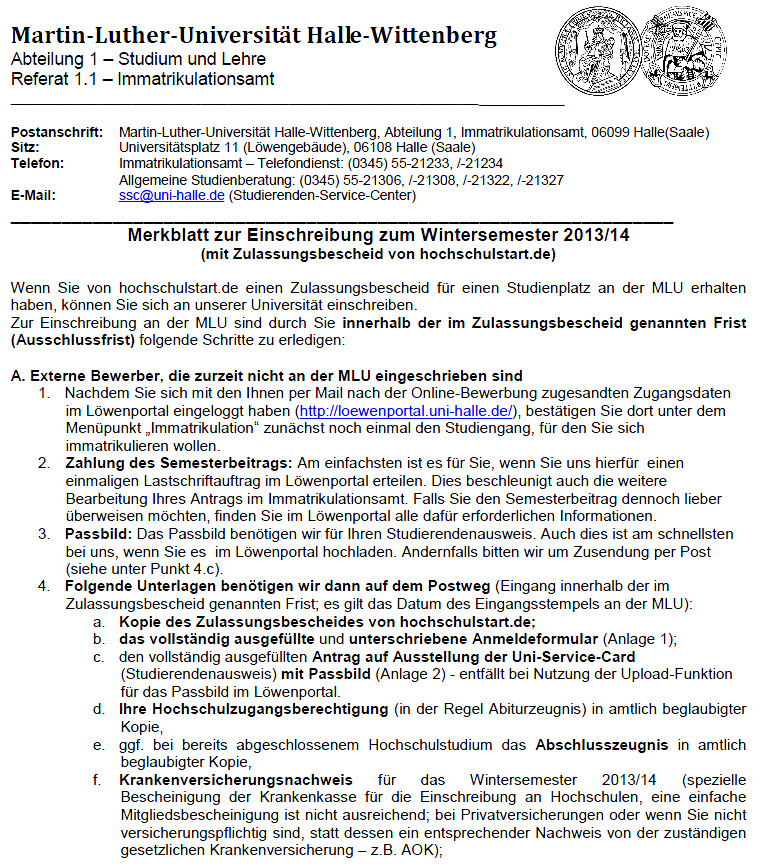 Das nebenstehende Merkblatt ist im Flattersatz formatiert, wodurch das Dokument optisch „unausgeglichen“ wirkt, da die Textinhalte nicht gleichmäßig innerhalb der Zeilen verteilt sind. In diesem Fall wird die „optische Unordnung“ verstärkt durch die Vielzahl von Aufzählungen, die zur Einrückung des Textes führen.
Optimierungsangebot
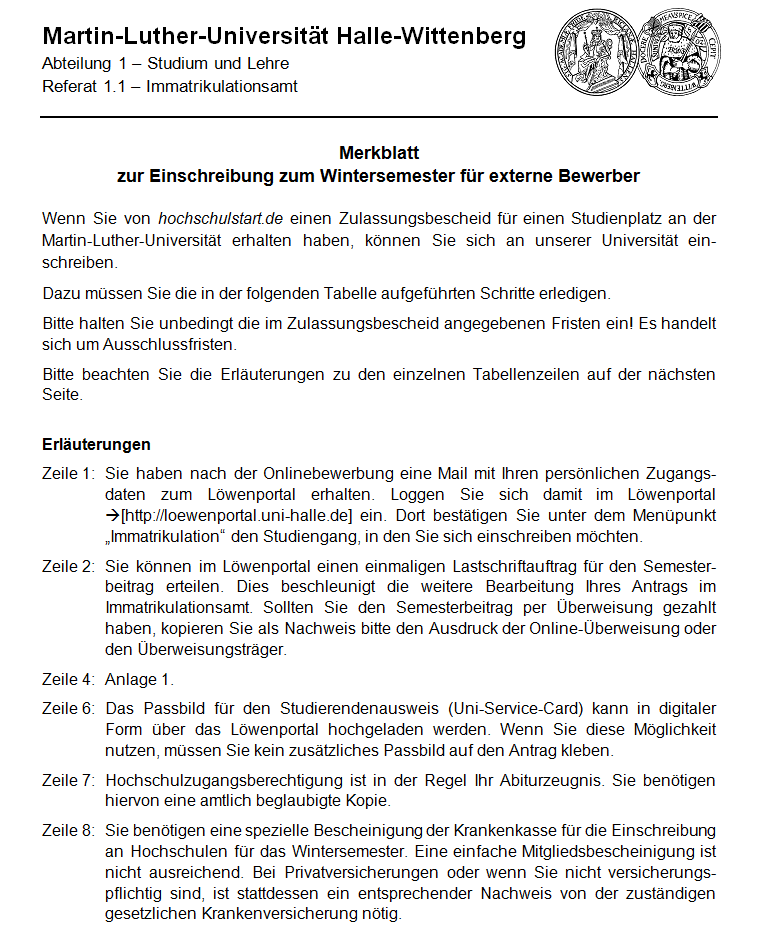 Die nebenstehenden Ausschnitte einer optimierten Version des Merkblatts sind im Blocksatz formatiert, wodurch der Text optisch ausgeglichen und deutlich strukturiert ist. Der Inhalt ist für einen Leser leichter zu erfassen.
Get started with Plex by visiting plex.tv/link and entering your device code. Once linked, you can conveniently stream your personal media across supported devices.
plex.tv/link allows users to pair compatible devices with their Plex accounts using a unique activation code. The setup is fast and requires only a few easy steps.
Easily activate your streaming device using plex.tv/link and enjoy smooth access to your Plex media library. The process is simple, secure, and beginner-friendly.
plex.tv/link is the official activation page for linking supported devices with Plex. The straightforward setup helps users start streaming quickly and efficiently.
Completing activation through plex.tv/link takes only a few moments. Enter the on-screen code to securely connect your device and access your Plex content.
Use plex.tv/link to link your compatible device and enjoy organized access to your movies, shows, music, and photos from one convenient platform.
plex.tv/link simplifies device activation by allowing users to pair supported hardware with their Plex accounts. Start watching your personal media library without delays.
Whether you’re using a smart TV or streaming player, plex.tv/link helps you connect it to your Plex account with a secure and easy verification process.
plex.tv/link provides an efficient way to authorize compatible devices for Plex. Simply log in, enter the activation code, and start enjoying your media instantly.
Connect your device using plex.tv/link and begin streaming your favorite media collection. The activation page is designed for quick, secure, and hassle-free pairing.
https://www.mises.cz/?ID=mytus-o-jfk-a-stribrnych-certifikatech-jako-duvodu-jeho-zavrazdeni-2544-0&action=komentare
Enjoy seamless streaming after completing activation through plex.tv/link The easy setup process helps you access your Plex content across supported platforms.
plex.tv/link makes device activation simple by allowing users to connect compatible TVs and streaming players using a unique verification code displayed on screen.
Visit plex.tv/link whenever you need to activate a new streaming device. The secure pairing process ensures smooth access to your Plex media library.
Setting up Plex is straightforward with plex.tv/link. The quick linking process allows you to enjoy your videos, music, and photos across multiple compatible devices.
plex.tv/link offers a simple activation method for supported devices. Sign in, enter the pairing code, and start streaming your organized media library effortlessly.
Stream your personal entertainment with ease by using plex.tv/link. The activation page securely links your device to your Plex account for convenient media access.
With plex.tv/link, connecting your streaming device is fast and user-friendly. Enter your activation code and enjoy your favorite content without complicated setup.
plex.tv/link helps users pair supported smart TVs and streaming devices with Plex. Complete the linking process in minutes and access your media collection seamlessly.
Activating your device through plex.tv/link is an easy way to stream movies, TV shows, music, and photos stored in your Plex library. Just enter the displayed code to begin.