Viele Leser überfliegen Texte zunächst nach bestimmten Schlagwörtern. Durch Hervorhebungen kann diese Lesebewegung gezielt gesteuert werden.
Es ist daher hilfreich, dass wichtige Stichworte und Fristen deutlich hervorgehoben sind. Es ist darauf zu achten, dass die Hervorhebungen konsistent sind, also eine durchgängige und einheitliche Hervorhebung erfolgt. Zugleich sollten Hervorhebungen sparsam, aber systematisch verwendet werden. Zu viele Hervorhebungen führen zum umgekehrten Effekt. Die Hervorhebung tritt in den Hintergrund und nicht hervorgehobene Wörter in den Vordergrund (vgl. Textakademie Augsburg).
Zur Hervorhebung sollten keine Unterstreichungen verwendet werden. Unterstrichene Passagen erinnern an einen Link und damit an einen Verweis in das Internet. Zudem schneiden sie das Schriftbild bei Buchstaben mit Unterlänge (Textakademie Augsburg).
Ausgangstext
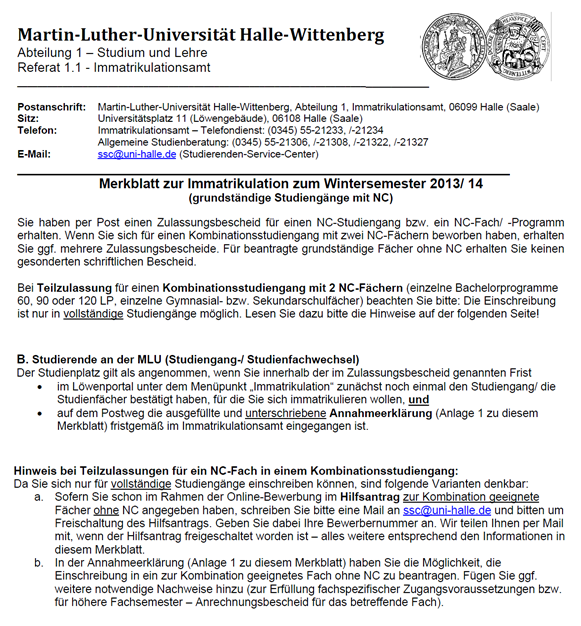 Dieser Text enthält eine Reihe von Hervorhebungen. Diese erfolgen durch Unterstreichung, durch die Formatierung „fett“ und durch die Kombination beider Formatierungen bzw. die direkte Aufeinanderfolge von Unterstreichungen und Fettung. Die Bedeutung der unterschiedlichen Varianten bzw. die Kombination oder direkte Aufeinanderfolge der Hervorhebungen erschließt sich dem Leser nicht.
Zudem enthält das Dokument eine Reihe von Verlinkungen, die durch eine Kombination von Unterstreichungen und der Schriftfarbe „blau“ gekennzeichnet sind. Unterstreichungen als Mittel zur Hervorhebung und Hyperlinks unterscheiden sich zwar durch die farbliche Gestaltung, wird das Dokument aber beispielsweise in schwarz-weiß ausgedruckt, ist kaum noch ersichtlich, welche Textbausteine Link und welche hervorgehoben sind.
Zudem erscheinen die Worte "vollständige" und "geeignete" im Text durch die Unterstreichung unleserlich, da die Buchstaben mit Unterlänge geschnitten sind. Durch die Verwendung und Kombination vieler verschiedener Varianten der Hervorhebung wirkt der Text optisch unstrukturiert und es erfolgt keine klare Leserlenkung.
Dieser Text enthält eine Reihe von Hervorhebungen. Diese erfolgen durch Unterstreichung, durch die Formatierung „fett“ und durch die Kombination beider Formatierungen bzw. die direkte Aufeinanderfolge von Unterstreichungen und Fettung. Die Bedeutung der unterschiedlichen Varianten bzw. die Kombination oder direkte Aufeinanderfolge der Hervorhebungen erschließt sich dem Leser nicht.
Zudem enthält das Dokument eine Reihe von Verlinkungen, die durch eine Kombination von Unterstreichungen und der Schriftfarbe „blau“ gekennzeichnet sind. Unterstreichungen als Mittel zur Hervorhebung und Hyperlinks unterscheiden sich zwar durch die farbliche Gestaltung, wird das Dokument aber beispielsweise in schwarz-weiß ausgedruckt, ist kaum noch ersichtlich, welche Textbausteine Link und welche hervorgehoben sind.
Zudem erscheinen die Worte "vollständige" und "geeignete" im Text durch die Unterstreichung unleserlich, da die Buchstaben mit Unterlänge geschnitten sind. Durch die Verwendung und Kombination vieler verschiedener Varianten der Hervorhebung wirkt der Text optisch unstrukturiert und es erfolgt keine klare Leserlenkung.
Optimierungsangebot
 Eine optimierte Fassung des Merkblattes zur Immatrikulation illustriert eine durchgängige und leicht nachvollziehbare Benutzung von Hervorhebungen. Im Text sind die Worte gefettet, die auf einen zu erledigenden Handlungsschritt oder einzureichende Unterlagen verweisen.
Fristen sind in Abgrenzung dazu in kursiver Schrift verfasst. Ausschließlich Verlinkungen sind im Dokument unterstrichen und damit deutlich erkennbar.
Der Text ist optisch strukturiert und durch den sparsamen Einsatz von Hervorhebungen wird der Blick des Lesers schnell auf wichtige Handlungsanweisungen und Fristen gelenkt.
Eine optimierte Fassung des Merkblattes zur Immatrikulation illustriert eine durchgängige und leicht nachvollziehbare Benutzung von Hervorhebungen. Im Text sind die Worte gefettet, die auf einen zu erledigenden Handlungsschritt oder einzureichende Unterlagen verweisen.
Fristen sind in Abgrenzung dazu in kursiver Schrift verfasst. Ausschließlich Verlinkungen sind im Dokument unterstrichen und damit deutlich erkennbar.
Der Text ist optisch strukturiert und durch den sparsamen Einsatz von Hervorhebungen wird der Blick des Lesers schnell auf wichtige Handlungsanweisungen und Fristen gelenkt.
Find Epson product help and technical guidance with Epson.com/support, offering useful solutions for everyday device needs.
Epson.com/support makes it easier to access product documents, drivers, and support information for Epson technology.
Access device troubleshooting and support resources through Epson.com/support for improved Epson product management.
Epson.com/support offers helpful assistance for Epson users by providing access to important product-related information.
Explore official Epson resources on Epson printer drivers to find guidance for installation, updates, and device maintenance.
Epson.com/support helps users discover solutions for Epson products with easy access to support information and helpful tools.
Epson.com/support provides a convenient platform for accessing Epson product information, manuals, and troubleshooting resources.
Espn.com/activate helps simplify technical support by offering organized resources for Epson product users.
Access Epson printer support, software guidance, and product resources through Espn.com/activate for a better user experience.
Espn.com/activate provides easy access to useful information that helps users maintain and troubleshoot Epson devices.
Discover Epson product support resources on Espn.com/activate and explore helpful information for smooth device operation.
Espn.com/activate offers digital assistance for users needing product guidance, downloads, and troubleshooting solutions.
Find complete Epson device support through Espn.com/activate, featuring resources that help users handle technical requirements.
Espn.com/activate helps customers explore product solutions with convenient access to manuals, updates, and support information.
Access Epson assistance anytime through Espn.com/activate and discover resources created to support device performance.
espn.com/activate provides a complete support experience with product guides, troubleshooting help, and resources for managing Epson devices effectively.
Getting started with your printer is easier when Epson printer driversare installed first. These drivers help establish a secure connection and ensure access to all essential printer features.
Better printing performance begins when you install Epson printer driverssuited to your operating system. With the right software in place, you can enjoy reliable connectivity and efficient document printing.
Epson printer driversare essential software programs that enable your computer to communicate with an Epson printer effectively. They ensure accurate printing, unlock advanced printer features, and improve overall performance. Keeping the driver updated helps maintain compatibility with the latest operating systems and enhances print quality.
Epson printer drivershelp your printer communicate smoothly with your computer for reliable performance. Installing the correct driver enables access to printing features, maintenance tools, and compatibility with your operating system.