Viele Leser überfliegen Texte zunächst nach bestimmten Schlagwörtern. Durch Hervorhebungen kann diese Lesebewegung gezielt gesteuert werden.
Es ist daher hilfreich, dass wichtige Stichworte und Fristen deutlich hervorgehoben sind. Es ist darauf zu achten, dass die Hervorhebungen konsistent sind, also eine durchgängige und einheitliche Hervorhebung erfolgt. Zugleich sollten Hervorhebungen sparsam, aber systematisch verwendet werden. Zu viele Hervorhebungen führen zum umgekehrten Effekt. Die Hervorhebung tritt in den Hintergrund und nicht hervorgehobene Wörter in den Vordergrund (vgl. Textakademie Augsburg).
Zur Hervorhebung sollten keine Unterstreichungen verwendet werden. Unterstrichene Passagen erinnern an einen Link und damit an einen Verweis in das Internet. Zudem schneiden sie das Schriftbild bei Buchstaben mit Unterlänge (Textakademie Augsburg).
Ausgangstext
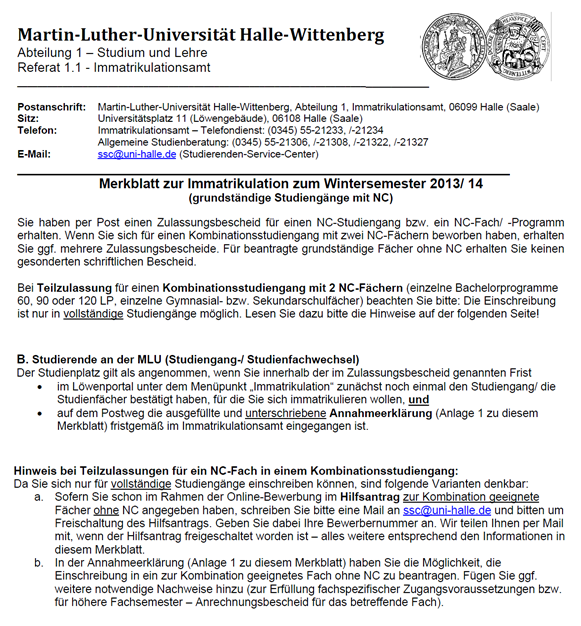 Dieser Text enthält eine Reihe von Hervorhebungen. Diese erfolgen durch Unterstreichung, durch die Formatierung „fett“ und durch die Kombination beider Formatierungen bzw. die direkte Aufeinanderfolge von Unterstreichungen und Fettung. Die Bedeutung der unterschiedlichen Varianten bzw. die Kombination oder direkte Aufeinanderfolge der Hervorhebungen erschließt sich dem Leser nicht.
Zudem enthält das Dokument eine Reihe von Verlinkungen, die durch eine Kombination von Unterstreichungen und der Schriftfarbe „blau“ gekennzeichnet sind. Unterstreichungen als Mittel zur Hervorhebung und Hyperlinks unterscheiden sich zwar durch die farbliche Gestaltung, wird das Dokument aber beispielsweise in schwarz-weiß ausgedruckt, ist kaum noch ersichtlich, welche Textbausteine Link und welche hervorgehoben sind.
Zudem erscheinen die Worte "vollständige" und "geeignete" im Text durch die Unterstreichung unleserlich, da die Buchstaben mit Unterlänge geschnitten sind. Durch die Verwendung und Kombination vieler verschiedener Varianten der Hervorhebung wirkt der Text optisch unstrukturiert und es erfolgt keine klare Leserlenkung.
Dieser Text enthält eine Reihe von Hervorhebungen. Diese erfolgen durch Unterstreichung, durch die Formatierung „fett“ und durch die Kombination beider Formatierungen bzw. die direkte Aufeinanderfolge von Unterstreichungen und Fettung. Die Bedeutung der unterschiedlichen Varianten bzw. die Kombination oder direkte Aufeinanderfolge der Hervorhebungen erschließt sich dem Leser nicht.
Zudem enthält das Dokument eine Reihe von Verlinkungen, die durch eine Kombination von Unterstreichungen und der Schriftfarbe „blau“ gekennzeichnet sind. Unterstreichungen als Mittel zur Hervorhebung und Hyperlinks unterscheiden sich zwar durch die farbliche Gestaltung, wird das Dokument aber beispielsweise in schwarz-weiß ausgedruckt, ist kaum noch ersichtlich, welche Textbausteine Link und welche hervorgehoben sind.
Zudem erscheinen die Worte "vollständige" und "geeignete" im Text durch die Unterstreichung unleserlich, da die Buchstaben mit Unterlänge geschnitten sind. Durch die Verwendung und Kombination vieler verschiedener Varianten der Hervorhebung wirkt der Text optisch unstrukturiert und es erfolgt keine klare Leserlenkung.
Optimierungsangebot
 Eine optimierte Fassung des Merkblattes zur Immatrikulation illustriert eine durchgängige und leicht nachvollziehbare Benutzung von Hervorhebungen. Im Text sind die Worte gefettet, die auf einen zu erledigenden Handlungsschritt oder einzureichende Unterlagen verweisen.
Fristen sind in Abgrenzung dazu in kursiver Schrift verfasst. Ausschließlich Verlinkungen sind im Dokument unterstrichen und damit deutlich erkennbar.
Der Text ist optisch strukturiert und durch den sparsamen Einsatz von Hervorhebungen wird der Blick des Lesers schnell auf wichtige Handlungsanweisungen und Fristen gelenkt.
Eine optimierte Fassung des Merkblattes zur Immatrikulation illustriert eine durchgängige und leicht nachvollziehbare Benutzung von Hervorhebungen. Im Text sind die Worte gefettet, die auf einen zu erledigenden Handlungsschritt oder einzureichende Unterlagen verweisen.
Fristen sind in Abgrenzung dazu in kursiver Schrift verfasst. Ausschließlich Verlinkungen sind im Dokument unterstrichen und damit deutlich erkennbar.
Der Text ist optisch strukturiert und durch den sparsamen Einsatz von Hervorhebungen wird der Blick des Lesers schnell auf wichtige Handlungsanweisungen und Fristen gelenkt.
Installing the latest Epson printer driverscan improve print quality and ensure stable communication between your printer and device. Updated drivers also support new operating system features and bug fixes.
To keep your printer running efficiently, download Epson printer driversthat match your printer model. Proper installation helps reduce errors and unlocks the full range of printing functions.
Reliable printing starts with the right software, and Epson printer driversmake that possible. They allow your computer to recognize the printer and support smooth document and photo printing.
Before using your printer, make sure Epson printer driversare installed correctly. The proper driver ensures better performance, faster printing, and access to advanced printer settings.
Your printer performs at its best when Epson printer driversare updated regularly. Current drivers improve device compatibility and help resolve common printing issues with ease.
Downloading Epson printer driversfor your specific printer model helps ensure seamless connectivity. Correct drivers also provide access to maintenance features and printer customization options.
For consistent performance, Epson printer driversshould always match your operating system version. This helps prevent installation errors and supports reliable printing across different applications.
A successful printer setup often begins with Epson printer driversinstalled on your device. These drivers enable your system to detect the printer and use all available functions effectively.
Whether you’re printing documents or photos, Epson printer driversplay a key role in delivering accurate results. They help optimize printer performance while maintaining compatibility with your computer.
Keeping Epson printer driversup to date can reduce connection problems and improve overall printing efficiency. Updated software also supports the latest security and performance enhancements.
To enjoy uninterrupted printing, install Epson printer driversthat are designed for your printer model. Proper drivers ensure smooth communication between hardware and software.
Every Epson printer works more efficiently with the correct Epson printer driversinstalled. They provide the necessary software support for printing, scanning, and routine maintenance tasks.
If your printer isn’t responding correctly, updating Epson printer driversmay help resolve the issue. New driver versions often improve stability and compatibility with modern operating systems.
Smooth printer operation depends on having Epson printer driversthat match your device configuration. They simplify setup, improve functionality, and enhance the overall printing experience.
123.hp.com install is the official setup portal for downloading the latest HP printer drivers and software. It helps users complete printer installation quickly with step-by-step guidance. Using the official source ensures secure downloads and smooth printer performance.
Setting up your HP printer is easier with 123.hp.com install, where you can access the latest software and drivers. The platform supports a wide range of HP printer models. It also provides simple instructions for a hassle-free installation experience.
Download the correct printer software through 123.hp.com install to ensure reliable performance. The official setup process helps establish a stable connection between your printer and computer. Updated drivers also improve compatibility with modern operating systems.
If you want a simple printer setup, 123.hp.com install offers an easy way to download HP printer drivers. The portal provides model-specific software for accurate installation. Following the setup steps helps achieve consistent printing results.
123.hp.com install makes HP printer installation straightforward by providing official driver downloads. Users can quickly configure wired or wireless printer connections. Regular driver updates also help maintain optimal printing performance.
For a smooth printer setup, visit 123.hp.com install and download the latest software for your HP device. The installation process is designed to be simple and user-friendly. Official drivers help improve print quality and device compatibility.